Project Glasshouse
Virtualizing macOS on Agnostic Infrastructure — from theoretical blueprint to zero-cost bootstrapping strategy for the Global South founder
| Subject | macOS virtualization on non-Apple cloud infrastructure; zero-cost bootstrapping; AI-driven automation; legal frameworks |
| Source | Google Gemini conversation with Joaquín Antonio "Piqui" Muñoz Ortiz — 20 turns, 2 Canvas documents, Deep Research report |
| Date | April 5, 2026 |
| Prepared by | Manus AI for The Launchpad TLP · thelaunchpadtlp.education |
| Status | Theoretical / Experimental — Legal gray area (Apple EULA). For research and educational purposes only. |
| Canvas Documents | "Deep Research and Fact-Checking" (31,277 chars) · "The Glasshouse Directive" whitepaper · God Mac.pdf |
The Glasshouse Directive
The computing landscape is undergoing a radical shift away from x86 architecture toward ARM-based processing, typified by Apple's transition to Apple Silicon. This pivot has historically made virtualizing macOS on non-Apple, generic cloud infrastructure a slow, heavily emulated process.
This briefing analyzes the state-of-the-art technologies that have shattered the "Emulation Tax," including hybrid binary translators and Vulkan-to-Metal graphics pipelines. It explores how modern AI agents securely host and operate these operating systems using microVM sandboxing and the Model Context Protocol (MCP). Finally, it outlines a radical, asymmetrical strategy for bootstrapped startups to achieve hyperscale macOS computing with zero capital by exploiting cloud free-tiers, CI/CD tunneling, and government innovation grants.
KosmicKrisp + Arancini eliminate the Emulation Tax — 5x faster, 81% fewer memory ops
MCP + mcp-server-macos-use gives AI agents deterministic, hallucination-free macOS control
GitHub Actions (free M1) + Oracle Always Free (24GB ARM) + Tailscale = $0.00 infrastructure
Why This Matters
The core claim of this conversation is that it is theoretically and practically possible to run Apple's macOS on non-Apple hardware — ranging from generic cloud servers to free CI/CD runners — and to fully automate these environments using AI agents. The conversation moves from traditional "Hackintosh" methods to a highly advanced theoretical architecture called Project Glasshouse.
The iOS App Store is one of the most lucrative digital markets in the world, but the entry ticket is a $1,000+ Apple computer. For developers and researchers in the Global South, or with zero capital, this represents a structural barrier to economic participation. Project Glasshouse proposes eliminating this barrier entirely.
With Apple planning to release macOS 27 exclusively for Apple Silicon, and macOS 28 slated to remove Rosetta 2 entirely by 2027, the traditional "Hackintosh" methodology has reached its terminal end of life. Hypervisor-based virtualization and advanced hardware emulation have become the sole viable pathways for executing Apple operating systems on non-Apple host infrastructure.
The ability to run macOS on agnostic hardware democratizes software development. It allows developers and researchers in the Global South and unfunded startups to build, compile, and test iOS/macOS applications without purchasing expensive physical Apple hardware. It pushes the boundaries of virtualization, forcing innovation in API translation and cross-ISA execution.
The Four-Phase Stack
Project Glasshouse is a four-phase software stack designed to detach Apple's software from Apple's hardware. Each phase solves a distinct technical problem that has historically made macOS virtualization on generic hardware either impossible or unusable.
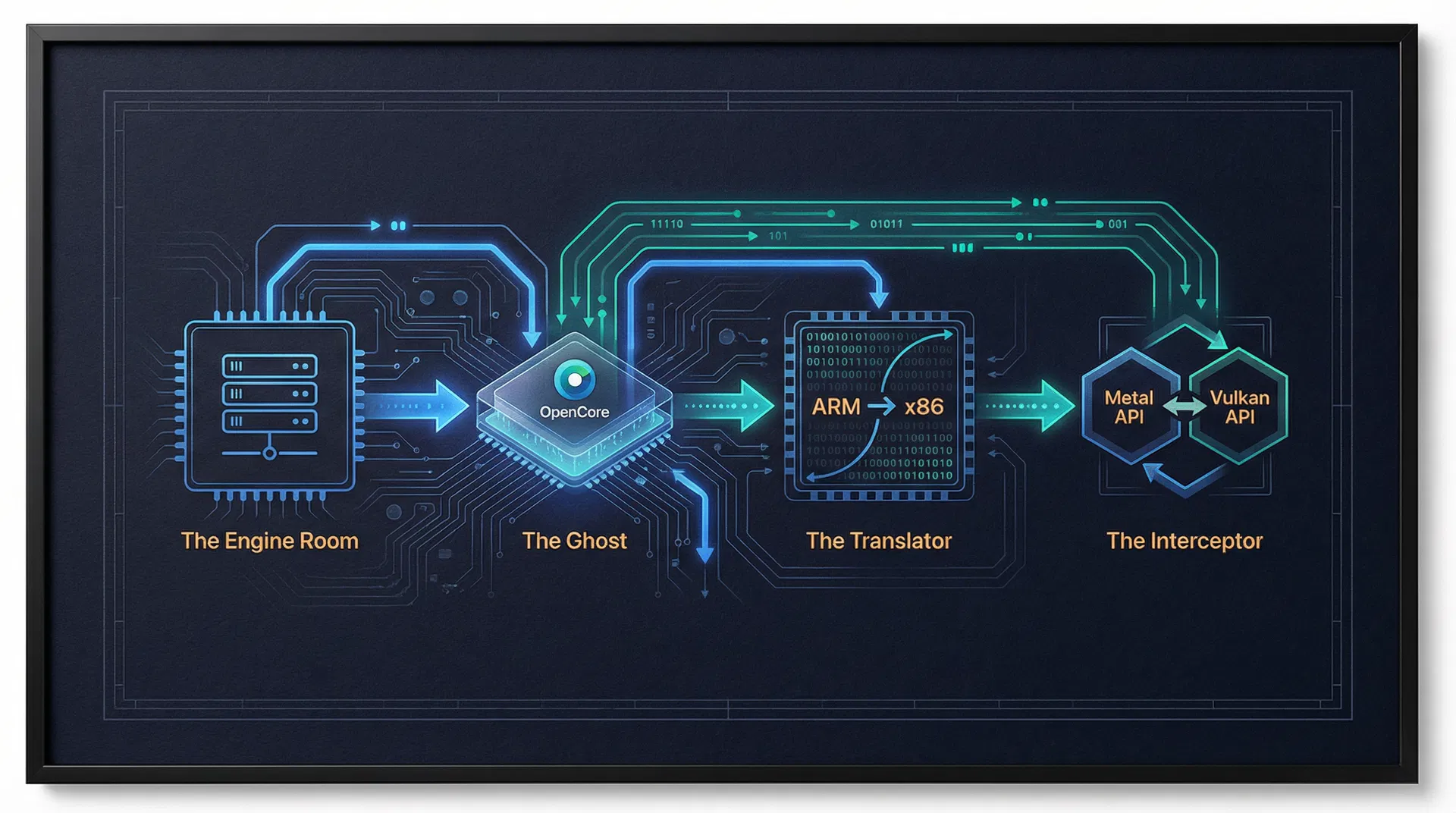
A hyper-optimized, bare-metal Linux host running a patched KVM hypervisor. Implements HugePages memory management and IOMMU PCIe passthrough for direct hardware access. In 2026, the industry standard is containerization via Docker-OSX, which packages QEMU, the OpenCore bootloader, and macOS recovery media into an Arch Linux container.
An advanced OpenCore bootloader fork that generates mathematically valid Apple hardware profiles — spoofing SystemUUID, MLB, ROM, and Secure Enclave cryptographic responses. Three kexts form the payload: Lilu.kext (master patching engine), VirtualSMC.kext (SMC spoofing), WhateverGreen.kext (framebuffer patching).
The Arancini Hybrid Binary Translator (HBT), presented at ASPLOS 2026, powered by LLVM. Uses Static Binary Translation (SBT) ahead of time for massive optimizations, with seamless fallback to Dynamic Binary Translation (DBT). Decreases memory access instructions by 81% and runs up to 5x faster than QEMU's TCG.
KosmicKrisp — a Vulkan-to-Metal Mesa driver released by LunarG in 2025. Achieves Vulkan 1.3/1.4 conformance on Apple Silicon, converting Vulkan commands into Apple's proprietary Metal commands. Combined with virtio-gpu and the Venus protocol, delivers native 60fps hardware acceleration inside the VM.
Master Blueprint — All APIs, SDKs, Frameworks & Coordinates
This compendium serves as the master blueprint for Project Glasshouse and the broader ecosystem of macOS virtualization as of 2026. It categorizes existing standards, emerging protocols, and the theoretical algorithms required to bridge the gap between Apple's proprietary silicon and agnostic cloud infrastructure.
1. KVM/QEMU (The Open Source Core)
- Coordinates: GitHub: qemu/qemu
- Logic: Uses KVM (Kernel-based Virtual Machine) for near-native CPU execution
- Technical Requirement: Requires hardware supporting Intel VT-x or AMD-V, plus AVX2 instruction sets
- OpenCore Integration: The config.plist must be tuned for the Q35 chipset
- Standard: virtio-gpu-pci for high-speed I/O
- 2026 Status: QEMU v9.2.0+ integrates KosmicKrisp alongside virtio-gpu-gl-pci
2. Docker-OSX (Containerized macOS)
- Coordinates: GitHub: sickcodes/Docker-OSX
- Architecture: Wraps QEMU inside a Docker container — macOS-as-a-Service
- 2026 Status: Supports macOS 26 (Tahoe) images out-of-the-box
- Use Case: Ideal for headless CI/CD and automated Xcode builds
- Limitation: On ARM64 hosts (AWS Graviton, Apple Silicon), falls back to pure software TCG — severe performance penalty
3. Apple Virtualization.framework (Native Only)
- High-level API for creating VMs on native Apple hardware only
- Requires VZVirtualMachineConfiguration + VZMacPlatformConfiguration
- Uses VZMacOSInstaller to extract and boot from .ipsw restore images
- Employs com.apple.security.virtualization entitlements — cannot be ported to Linux
Implementation Code & Algorithms
Phase 1: Host Provisioning Script
#!/bin/bash
# Project Glasshouse: Phase 1 — Host Provisioning Script
apt-get update -y && apt-get install -y qemu-kvm libvirt-daemon-system \
  libvirt-clients bridge-utils ovmf
systemctl enable --now libvirtd

# Inject IOMMU flags for PCIe hardware passthrough
sed -i 's/GRUB_CMDLINE_LINUX_DEFAULT="/GRUB_CMDLINE_LINUX_DEFAULT="amd_iommu=on \
  iommu=pt kvm.ignore_msrs=1 /g' /etc/default/grub
update-grub && update-initramfs -u

# HugePages for 1GB RAM blocks (eliminates memory translation overhead)
echo "vm.nr_hugepages = 1024" >> /etc/sysctl.conf
sysctl -p
Phase 2: OpenCore Cryptographic Ghost Configuration
<!-- OpenCore config.plist — Cryptographic Ghost Configuration -->
<key>PlatformInfo</key>
<dict>
  <key>Generic</key>
  <dict>
    <!-- AI-generated mathematically valid Apple hardware profile -->
    <key>MLB</key>
    <string>C02XXXXXXXXXX</string>
    <key>SystemSerialNumber</key>
    <string>C02XXXXXXXXXX</string>
    <key>SystemUUID</key>
    <string>XXXXXXXX-XXXX-XXXX-XXXX-XXXXXXXXXXXX</string>
    <key>SystemProductName</key>
    <string>MacPro7,1</string>
    <!-- VirtualSMC intercepts SMC calls and returns spoofed responses -->
    <key>ROM</key>
    <data>AAAAAAAA</data>
  </dict>
  <key>Automatic</key>
  <true/>
</dict>
Phase 3: Arancini / LLVM IR Lifting (AI-Driven JIT)
// Project Glasshouse: Arancini-inspired AI-Driven Execution Engine (Rust)
fn execute_macos_instruction(
    aarch64_block: &Block
) -> Result<(), ExecutionError> {

    // 1. Check the AI-Predicted Translation Cache (SBT result)
    if let Some(native_x86) = ai_cache.get(&aarch64_block.hash) {
        // Cache hit — execute natively on cloud server CPU
        execute_on_bare_metal(native_x86);
        return Ok(());
    }

    // 2. Cache Miss: LLVM IR lifting + JIT compilation (DBT fallback)
    let ir = lift_to_llvm_ir(aarch64_block);
    // Apply formally verified memory ordering mappings (TSO → weak model)
    let ir_with_fences = apply_formal_memory_mappings(ir);
    let optimized = llvm_optimize_for_avx512(ir_with_fences);
    let x86_block = compile_to_x86_64(optimized);

    // 3. Cache and execute
    ai_cache.insert(aarch64_block.hash, x86_block.clone());
    execute_on_bare_metal(&x86_block);
    Ok(())
}
Phase 4: Metal-to-Vulkan Kernel Extension (The Interceptor)
// Project Glasshouse: Virtual GPU Kernel Extension (C++)
// GlasshouseGPU.kext — intercepts Apple Metal API commands
IOReturn GlasshouseGPU::SubmitCommandBuffer(
    IOUserClient* client,
    MetalCommandBuffer* cmd
) {
    // 1. Intercept the Apple Metal graphics command from WindowServer
    SerializedMetal payload = SerializeForHost(cmd);

    // 2. Fire down to Linux host via VirtIO Ring Buffer (Venus protocol)
    virtio_ring_write(this->virtio_queue, &payload, sizeof(payload));

    // 3. Notify the Linux Hypervisor to process graphics
    // KosmicKrisp on host translates Vulkan → Metal for Apple Silicon
    virtio_notify_host(this->virtio_queue);

    return kIOReturnSuccess;
}Agentic macOS Control via Model Context Protocol
Modern AI models (Claude 3.5/4.5/4.6, GPT-4, Gemini, Manus) do not just chat — they autonomously operate operating systems. The release of Claude 3.5 Sonnet marked the definitive transition from conversational LLMs to proactive Large Action Models (LAMs) via native "Computer Use" capabilities.
The Limitations of Vision-Only Automation
Initial iterations relied strictly on a "vision-only" methodology — the AI captured screenshots, analyzed visual layout, and generated X/Y pixel coordinates. This proved inherently brittle: minor UI updates, resolution scaling changes, notification popups, or dynamic layouts could derail the agent entirely.
The Model Context Protocol (MCP) Solution
MCP is an open-source, standardized transport layer utilizing JSON-RPC 2.0 messages, developed by Anthropic and standardized by Google and Anthropic in 2025. Supported by Docker Desktop as of March 2026. Instead of guessing pixel coordinates, MCP allows developers to build local servers that expose exact, deterministic programmatic tools to the model.
Two Primary MCP Architectures
| Server | Approach | Key Capability |
|---|---|---|
| mcp-server-macos-use | Semantic Traversal (Swift) | Traverses AXUIElement accessibility tree — reads exact UI roles, labels, states. Zero hallucination. Uses macos-use_click_and_traverse with PID targeting. |
| automation-mcp | Peripheral Control (TypeScript) | Raw mouse paths, keyboard chords, pixel color sampling, window management. Uses node-based automation libraries. |
| mcp-xcode-agent | Xcode Build Control | Controls Xcode builds, tests, and deployments from a chat interface. |
| PyAutoGUI + osascript | Hybrid Python/AppleScript | Low-level UI automation + deep OS hooks via native AppleScript execution. |
Complete MCP Server Implementation
# Project Glasshouse: macOS MCP Agent Server
# Full implementation from the Gemini conversation
import asyncio, subprocess, pyautogui
from mcp.server import Server
from mcp.types import Tool, TextContent

app = Server("macos-glasshouse-agent")

@app.list_tools()
async def list_tools() -> list[Tool]:
    return [
        Tool(
            name="click_ui_element",
            description="Moves mouse to X,Y coordinates and clicks.",
            inputSchema={
                "type": "object",
                "properties": {
                    "x": {"type": "integer", "description": "X coordinate on the macOS screen"},
                    "y": {"type": "integer", "description": "Y coordinate on the macOS screen"},
                    "click_type": {"type": "string", "enum": ["left", "right", "double"]}
                },
                "required": ["x", "y"]
            }
        ),
        Tool(
            name="execute_applescript",
            description="Executes native AppleScript to control macOS apps.",
            inputSchema={
                "type": "object",
                "properties": {"script": {"type": "string"}},
                "required": ["script"]
            }
        ),
        Tool(
            name="type_text",
            description="Simulates physical keyboard typing.",
            inputSchema={
                "type": "object",
                "properties": {
                    "text": {"type": "string"},
                    "press_enter": {"type": "boolean"}
                },
                "required": ["text"]
            }
        )
    ]

@app.call_tool()
async def call_tool(name: str, arguments: dict):
    if name == "click_ui_element":
        x, y = arguments["x"], arguments["y"]
        click_type = arguments.get("click_type", "left")
        pyautogui.moveTo(x, y, duration=0.2)  # Human-like movement latency
        if click_type == "left": pyautogui.click()
        elif click_type == "right": pyautogui.rightClick()
        elif click_type == "double": pyautogui.doubleClick()
        return [TextContent(type="text", text=f"Clicked {click_type} at ({x}, {y})")]

    elif name == "execute_applescript":
        result = subprocess.run(
            ["osascript", "-e", arguments["script"]],
            capture_output=True, text=True, check=True
        )
        return [TextContent(type="text", text=f"Output: {result.stdout}")]

    elif name == "type_text":
        pyautogui.write(arguments["text"], interval=0.01)
        if arguments.get("press_enter", False): pyautogui.press('enter')
        return [TextContent(type="text", text="Text typed successfully.")]

async def main():
    from mcp.server.stdio import stdio_server
    async with stdio_server() as (read_stream, write_stream):
        await app.run(read_stream, write_stream, app.create_initialization_options())

if __name__ == "__main__":
    asyncio.run(main())
The AI Lifecycle
AI receives a screenshot of the macOS desktop via parallel WebRTC or VNC stream
LLM analyzes pixels, identifies the Xcode icon at coordinates (1200, 850)
LLM formulates a JSON request to the MCP Server for click_ui_element
MCP server translates JSON into pyautogui commands — cursor moves and clicks
New screenshot confirms Xcode opened — loop continues until task completes
Security: MicroVM Sandboxing for AI Agents
Running advanced LAMs directly on a bare-metal workstation poses unacceptable security risk — a malicious prompt injection attack hidden inside a website or email could hijack the agent. Industry standards now rely on:
- AWS Firecracker MicroVMs: Ephemeral, lightweight VMs that spin up in milliseconds with fully isolated Linux/macOS filesystems, destroyed after task completion
- Kata Containers: Container-compatible microVM isolation
- Google gVisor: User-space kernel for lightweight sandboxing
- Zero-trust network namespaces: Strict egress filtering — blocks LAN access, whitelists only required domains
- WebAssembly (Wasm): Safely sanitizes and executes LLM-generated Python scripts without full hypervisor overhead
Advanced Architectures in macOS Virtualization (April 2026)
This section reproduces the findings of the Deep Research Canvas document generated by Gemini's Deep Research mode, which conducted comprehensive fact-checking and nuance-adding across all claims in the conversation.
Apple is planning to release macOS 27 exclusively for Apple Silicon, and macOS 28 is slated to remove the Rosetta 2 dynamic translation layer entirely by 2027. The traditional "Hackintosh" methodology has effectively reached its terminal end of life. Hypervisor-based virtualization and advanced hardware emulation have become the sole viable pathways for executing Apple operating systems on non-Apple host infrastructure.
On native Apple hardware, Apple's Virtualization.framework provides near-bare-metal execution speeds but is structurally and legally bound to Apple hardware via specialized entitlements (com.apple.security.virtualization). It cannot be ported to Linux or Windows host machines.
For Linux/Windows environments, QEMU/KVM remains the foundational infrastructure. Docker-OSX packages QEMU, OpenCore, and macOS recovery media into an Arch Linux container. However, on ARM64 hosts, the lack of native x86 virtualization forces fallback to pure software TCG — rendering the graphical interface nearly unusable.
Zero-Cost "God-Mac" Infrastructure
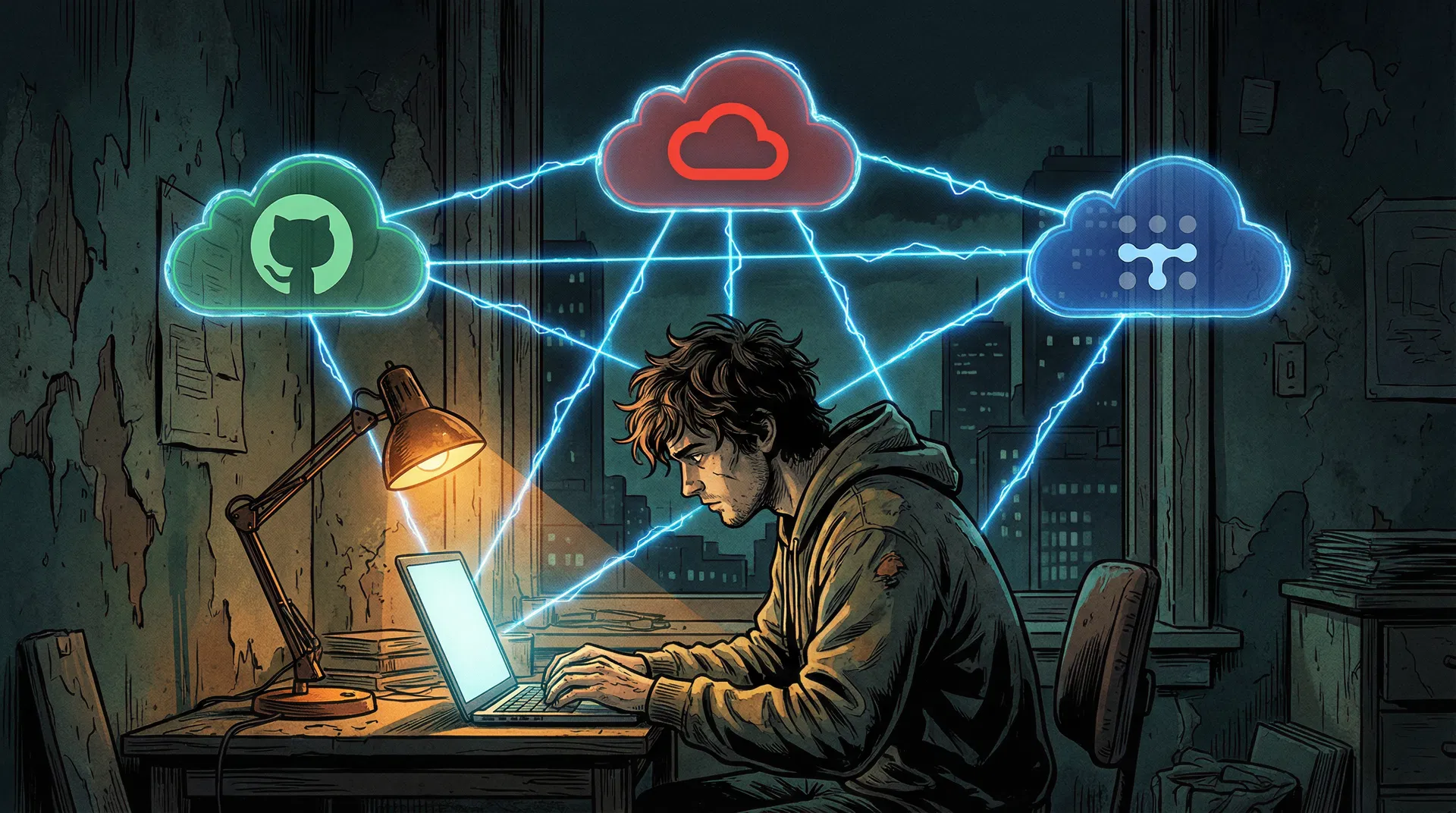
When you have no money, your primary currency is cunning, open-source leverage, and exploiting corporate free tiers to their absolute limits. The Scavenger Architecture chains four components into a persistent, AI-automated macOS ecosystem that costs exactly $0.00 to operate.
GitHub provides free, bare-metal macOS runners (including M1 Apple Silicon) for CI/CD on public repositories. A workflow requesting runs-on: macos-14 boots a free M1 instance. Instead of compiling code, the workflow installs VNC, Tailscale, and enters a sleep 21000 state (5.8 hours). The catch: GitHub kills jobs after 6 hours. The workaround: a cron job on the Oracle server commits a dummy file every 5.5 hours, triggering a fresh runner before the old one dies.
Oracle Cloud offers the most generous free tier in the world: an ARM-based Ampere A1 instance with 4 CPU cores, 24GB RAM, and 200GB block storage for exactly $0.00. This is the permanent command center. With 24GB RAM, it can run quantized local AI models (Llama 3, Mistral) via llama.cpp entirely for free. Execution: Deploy Ubuntu, SSH in, install Docker and Tailscale. Max out the sliders to 4 OCPUs and 24GB RAM.
Tailscale (free for personal use) links the Oracle server, the GitHub Mac, and the user's local device into a single virtual LAN. All machines act as if plugged into the same router, bypassing firewalls and NAT restrictions. The ephemeral GitHub Mac is reachable via a stable Tailscale IP immediately after the workflow starts. Install via brew install tailscale, authenticate with an ephemeral auth-key stored in GitHub Secrets.
mcp-server-macos-use (Swift, by mediar-ai) intercepts macOS accessibility APIs, exposing the full UI tree to an AI without requiring expensive vision models. automation-mcp handles raw mouse/keyboard physics. Combined with a local Llama 3 model on the Oracle server, the entire AI automation stack costs zero dollars per inference. Install: git clone https://github.com/ashwwwin/automation-mcp.git, then bun install && bun run index.ts
Step-by-Step Execution
# .github/workflows/mac-tunnel.yml
# The GitHub Actions "Scavenger" Workflow
name: Glasshouse Mac Tunnel
on:
  push:
    branches: [main]
  schedule:
    - cron: '0 */5 * * *'  # Auto-restart every 5.5 hours

jobs:
  mac-tunnel:
    runs-on: macos-14  # Free M1 Apple Silicon runner
    timeout-minutes: 360
    steps:
      - name: Install Tailscale
        run: brew install tailscale

      - name: Connect to Tailscale network
        run: sudo tailscale up --authkey=${{ secrets.TAILSCALE_KEY }} --ephemeral

      - name: Enable VNC Screen Sharing
        run: |
          sudo /System/Library/CoreServices/RemoteManagement/\
          ARDAgent.app/Contents/Resources/kickstart \
          -activate -configure -access -on \
          -clientopts -setvnclegacy -vnclegacy yes \
          -clientopts -setvncpw -vncpw ${{ secrets.VNC_PASSWORD }} \
          -restart -agent -privs -all

      - name: Install AI Automation Layer
        run: |
          git clone https://github.com/ashwwwin/automation-mcp.git
          cd automation-mcp && bun install && bun run index.ts &

      - name: Hold runner alive (5.8 hours)
run: sleep 21000Hyperscale Compute for $0 — The Glasshouse Directive
For a brilliant, underfunded researcher or startup founder, capital is an illusion. Compute can be mined, scavenged, and augmented using radical, overlapping strategies. This playbook goes far beyond the basic Scavenger Architecture — it encompasses institutional, legal, political, financial, and technical dimensions.
Oracle Cloud offers the most aggressive 'Always Free' tier in the world. Permanently claim an ARM-based Ampere A1 instance with 4 CPU Cores and 24GB of RAM. Deploy Ubuntu Linux. Use the Arancini binary translator to run x86 macOS binaries, or host local, quantized AI models (like Llama 3) via llama.cpp to act as your free, persistent AI orchestrator.
GitHub provides free, bare-metal M1 Apple Silicon runners for public repositories. Write a GitHub Actions script that boots a macOS runner, installs a mesh VPN (Tailscale), and initiates a VNC server. You now have a free, hardware-accelerated Mac. Since jobs time out after 6 hours, write a cron-job on your Oracle mothership to trigger a new GitHub Action every 5.5 hours, persisting your data via cloud storage.
When tech giants and government agencies upgrade, they liquidate massive clusters of perfectly functional hardware for pennies on the dollar. Monitor platforms like GSA Auctions (gsaauctions.gov), GovDeals (govdeals.com), and Municibid. You can frequently purchase pallets of decommissioned Apple Mac Minis or enterprise servers from universities or federal departments for under $100. Rack them in your garage, install Proxmox, and build a localized Kubernetes cluster.
Governments are pouring billions into 'Sovereign AI' to break US hyperscaler monopolies. Apply for compute grants: EU offers massive funding through GenAI4EU. Canada has the Sovereign Compute Infrastructure Program (SCIP). For the Global South: EVAH and the AI for Good Impact Awards provide up to $60M in compute access and funding. Apply to Microsoft for Startups or AWS Activate for up to $100,000–$350,000 in immediate, non-dilutive cloud credits. The EU's Digital Markets Act (DMA) Article 6(7) mandates free and effective interoperability — startups are structuring operations in the EU to leverage this as a legal shield.
If you have cybersecurity skills, platforms like HackerOne and Immunefi pay massive bounties (sometimes up to $1M+). Don't just take cash. Many programs (like DigitalOcean or Google Cloud VRP) offer massive multipliers if you accept payouts in cloud compute credits. Use automated, AI-driven reconnaissance to map subdomains and mine low-hanging vulnerabilities to indefinitely fund your infrastructure.
Additional Alternative Approaches
Decentralized Physical Infrastructure Networks (Render, Fluence, Akash) use blockchain to crowdsource idle GPU/CPU globally. 45–60% below AWS prices for containerized macOS rendering tasks.
A translation layer that allows macOS Mach-O binaries to run directly on Linux without a hypervisor. GitHub: darlinghq/darling
Extensive research underway to port dynamic binary translators to RISC-V supercomputers — preparing for a post-ARM, hardware-agnostic future.
Structure operations in the EU to leverage DMA Article 6(7) interoperability mandates as a legal shield against Apple's closed ecosystem enforcement.
The Corellium Precedent & Fair Use
Apple's Software License Agreement (SLA) and EULA strictly and unambiguously stipulate that macOS may only be installed, virtualized, and executed on genuine Apple-branded hardware. This renders the use of Docker-OSX or QEMU/KVM deployments running macOS on commodity servers a direct violation of civil contract terms.
Apple v. Corellium (2019–2023)
A critical legal distinction exists between a EULA violation and actionable copyright infringement. Corellium successfully commercialized a platform (CORSEC) that replicated the iOS and macOS kernels for cybersecurity research. Apple sued for direct copyright infringement.
In a landmark ruling, the 11th Circuit Court of Appeals ruled in favor of Corellium, establishing that virtualizing an Apple operating system for security research falls under the "fair use" doctrine. The court found the virtualization software was highly "transformative" and did not substantially harm Apple's hardware market. The case culminated in a confidential settlement in late 2023.
Cybersecurity research, vulnerability discovery, academic research, security testing in controlled environments — following the Corellium precedent.
Mass distribution of virtualized macOS for general consumer use, standard software development on commodity hardware, commercial deployment.
Article 6(7) of the Digital Markets Act mandates free and effective interoperability for third parties with iOS/iPadOS hardware/software features. Startups structuring in the EU can leverage this.
The Digital Millennium Copyright Act's anti-circumvention provisions may apply to bypassing Apple Hardware Verification (AHV). Research exemptions exist under 17 U.S.C. § 1201(f).
Official cloud computing providers offering macOS hosting (AWS EC2 Mac instances, MacStadium, Liquid Web) continue to utilize physical, bare-metal Mac Mini hardware mounted in specialized server racks — ensuring strict EULA compliance and bypassing legal ambiguities of multi-tenant macOS VMs on commodity silicon.
Ramifications for Education, Work & Entrepreneurship
The Key Insight: Emulation Tax vs. API Translation
The single most important conceptual contribution in this dialogue is the "Emulation Tax" vs. "API Translation" paradigm. Traditionally, running macOS on generic hardware requires emulating a physical GPU — computationally crushing, resulting in an unusable interface. Project Glasshouse's insight is to stop emulating hardware and start translating software APIs.
This makes visible the fact that hardware lock-in is increasingly a software enforcement problem, not a physical physics problem. If an AI or translation layer is fast enough, the underlying silicon becomes irrelevant. This is the same insight that powered Valve's Proton (Windows games on Linux) and Apple's own Rosetta 2 (x86 apps on Apple Silicon).
Critical Perspectives — Operational Fragility
Apple's EULA forbids macOS on non-Apple hardware. Any commercial deployment invites immediate Cease & Desist orders and lawsuits. The Corellium precedent only protects security research.
Bypassing the Secure Enclave and T2 chip compromises cryptographic trust. Storing sensitive data on a 'Ghost Mac' is highly insecure. AI agents require microVM isolation.
Apple frequently updates macOS, breaking Hackintosh patches. Maintaining a custom Metal-to-Vulkan bridge requires constant vigilance. The Scavenger Architecture is inherently fragile.
The GitHub Actions tunneling hack violates GitHub's Terms of Service. Building startup infrastructure on TOS violations risks catastrophic, unrecoverable account bans.
Implications for The Launchpad TLP
For Piqui's domains — education management, entrepreneurship, and social leadership in Latin America — the implications are profound. The iOS App Store is one of the most lucrative digital markets in the world, but the entry ticket is a $1,000+ Apple computer. The Scavenger Architecture proves that the technical barrier to entry can be bypassed with pure resourcefulness.
The integration of MCP means that AI is no longer just generating text; it is operating the machine. For a solo founder, an AI agent running on a free cloud server can act as a tireless employee — scraping competitor data, running tests, managing social media — all orchestrated through a remote, automated macOS instance.
Verified Sources from Deep Research
The following sources were cited and verified by Gemini's Deep Research mode during the fact-checking phase of this conversation.
Primary Technical Sources
| Category | Resource | Link |
|---|---|---|
| Virtualization | QEMU/KVM Project | github.com |
| Containerization | Docker-OSX | github.com |
| Bootloader | OpenCore / acidanthera | github.com |
| Graphics (Forward) | MoltenVK / Khronos | github.com |
| Graphics (Reverse) | KosmicKrisp / LunarG | www.lunarg.com |
| Compatibility | Darling Project | github.com |
| AI Protocol | Model Context Protocol | modelcontextprotocol.io |
| Mac Automation MCP | mcp-server-macos-use | github.com |
| UI Automation MCP | automation-mcp | github.com |
| OS Images | gibMacOS | github.com |
| Free Cloud | Oracle Always Free | cloud.oracle.com |
| Mesh VPN | Tailscale | tailscale.com |
| Local AI | llama.cpp | github.com |
| Hypervisor | Proxmox VE | proxmox.com |
| MicroVM | AWS Firecracker | github.com |
| Decentralized Compute | Akash Network | akash.network |
| Decommissioned HW | GSA Auctions | gsaauctions.gov |
| Decommissioned HW | GovDeals | govdeals.com |
| EU Grants | GenAI4EU | digital-strategy.ec.europa.eu |
| Startup Credits | AWS Activate | aws.amazon.com |
| Startup Credits | Microsoft for Startups | startups.microsoft.com |
| Bug Bounties | HackerOne | hackerone.com |
| Bug Bounties | Immunefi | immunefi.com |